The best crypto wallets
Some links on this page are affiliate links. If you buy through them, we may earn a commission at no extra cost to you. It never changes what we recommend. How we make money
Short answer
For most people the best crypto wallet is two wallets: a hot wallet (a free app) for the money you spend, and a cold wallet (a hardware device) for the money you keep. Our top hardware pick is the Trezor Safe 5 ($129). The best free app for a beginner is Exodus.
This page is researched from the makers' own specification and price pages, published security research and each company's incident record in 2025 and 2026. We haven't tested the devices hands-on. We may earn a commission from Trezor, Ledger, BitBox and Tangem, and nothing from the four apps. The order comes from the six points under How we ranked them.
Hot wallet vs cold wallet: decide this first
A crypto wallet holds the private keys that let you move your coins. The coins themselves are recorded on the blockchain. To send coins you sign the payment, which means approving it with your keys, so the main question is where those keys live.
A hot wallet keeps them in an app on a phone or computer that is online. A cold wallet keeps them on a separate device that never hands them to the internet; you connect it only to approve a payment.
| Hot wallet (app) | Cold wallet (hardware) | |
|---|---|---|
| Where the keys live | Your phone or computer | A separate device |
| Cost | Free | About $55 to $400 |
| Good for | Spending, trading, apps | Savings you rarely touch |
| Main risk | Malware or a fake app on the device | Losing both device and backup |
| You approve payments on | The same screen malware can see | The device's own screen |
A simple rule: if losing the amount would hurt, it belongs on a hardware wallet. Keep a small spending balance in an app and move the rest across as it grows. The two work together. Exodus and Sparrow both let a hardware wallet hold the keys while you use the app as the screen you manage coins from.
An exchange account (Coinbase, Kraken, Binance) is a custodial wallet: the exchange holds the keys and you hold a login. Every pick on this page is non-custodial, meaning the keys are yours. Nobody can freeze or lose them for you, and nobody can recover them if you do.
Top crypto wallets compared
| Wallet | Best for | Type | Connects by | Price |
|---|---|---|---|---|
| Trezor Safe 5 | Most people's savings | Hardware, 1.54" colour touchscreen | USB-C | $129 |
| Ledger Nano Gen5 | Phones, many coins | Hardware, 2.8" E Ink touchscreen | USB-C, Bluetooth, NFC | $179 |
| Trezor Safe 3 | A tight budget | Hardware, 0.96" mono screen, buttons | USB-C | $59 |
| BitBox02 Nova | Bitcoin only | Hardware with screen | USB-C, Bluetooth (can be off) | €175* |
| Tangem Wallet | No words to write down | Hardware cards, no screen | NFC | $54.90 |
| Exodus | Beginners | App | Desktop, iOS, Android | Free |
| MetaMask | Ethereum apps | App | Web, iOS, Android | Free to install |
| Trust Wallet | Many coins on a phone | App | iOS, Android, browser | Free to install |
| Sparrow | Bitcoin on a computer | App | macOS, Windows, Linux | Free, open source |
The picks below are in ranked order. Hardware wallets come first because they keep keys off your phone and show you what you are signing on a screen of their own.
Trezor Safe 5
Best hardware wallet overall
$129Check price
The Safe 5 is our pick for the best hardware wallet for most people. It has a 1.54-inch colour touchscreen and a certified secure chip that has passed an independent security evaluation (rated EAL6+, among the higher grades). Its software is open source, so outside researchers can inspect it. It connects by cable only.
Backup is flexible. You can write down a standard list of recovery words, or split the backup into several shares with what Trezor calls Advanced Multi-share Backup, so one stolen card isn't the whole key. You can also add a passphrase: an extra word you choose and keep separately, without which the recovery words alone won't open the wallet.
Pros
- Colour touchscreen at a mid price
- Secure chip plus open-source software
- Multi-share backup option
Cons
- No Bluetooth, so a phone needs a cable
- Trezor's shipping and email partners leaked customer contact data in 2026
In August 2026 a shipping provider exposed the names, emails, phone numbers and addresses of 80,689 Trezor customers. Trezor said devices and recovery phrases were not affected in its own incident notice. In September a breach at Trezor's email service led to phishing aimed at about 347,000 newsletter addresses (BleepingComputer). A Trezor buyer should expect fake "security alert" emails and ignore them.
The 2025 lab attack on the Safe 3 (below) was reported to use a different processor from the Safe 5. Some reports say the same research also criticised how the Safe 5 checks its firmware; we couldn't confirm that from the sources we read.
Skip it if you want to use a hardware wallet with your phone and no cable.
Ledger Nano Gen5
Best for phones and many coins
$179Check price
If you use crypto mostly from a phone, the Nano Gen5 is the hardware wallet built for it. It connects by Bluetooth or NFC (tap-to-connect, like a contactless card) as well as USB-C, runs up to ten hours on a charge, and has a 2.8-inch touchscreen of the paper-like E Ink kind used in e-readers. Ledger's own app supports over 500 coins directly.
The secure chip is rated EAL6+, the same grade as Trezor's. A Ledger Recovery Key, an NFC card that stores a backup, comes in the box.
Pros
- Bluetooth and NFC for phones
- 500+ coins supported directly
- Large screen at a mid price
Cons
- We found no statement that the device firmware is open source
- The longest incident record of the picks
A 2020 breach exposed about 272,000 Ledger customers' names and home addresses. In 2023 Ledger launched Recover, an optional $9.99-a-month service that splits your backup into three pieces held by outside companies. The backlash was that the firmware could export a backup at all. A December 2023 attack on a Ledger software library drained roughly $600,000 from people using connected apps; the devices themselves were not breached (BleepingComputer). In January 2026 a payment partner exposed order details. The 2020 and 2026 leaks exposed contact details, not keys. That record, and the closed firmware, are why it ranks below the Safe 5; phone support is why it ranks above the rest.
Skip it if open-source code matters to you, or you never use crypto from a phone.
Trezor Safe 3
Best budget hardware wallet
$59Check price
At $59 the Safe 3 has the same EAL6+ chip rating, open-source software and backup options as the Safe 5. What you give up is the screen: a small 0.96-inch monochrome display and two buttons instead of a touchscreen, so a long address is shown in parts.
In March 2025 researchers at Ledger's lab showed a way to tamper with the Safe 3's main processor, given physical access to the device and lab equipment (The Block). Trezor called the risk largely theoretical. Because the attack needs the device in hand, keep it somewhere safe and consider a passphrase.
Pros
- Cheapest device here with its own screen
- Open-source software
Cons
- Small mono screen, button navigation
- Cable only
Skip it if you will check long addresses or approve app transactions often; the Safe 5's screen is worth the extra $70.
BitBox02 Nova
Best cold wallet for Bitcoin
€175Check price
BitBox sells the Nova in two editions that can't be converted later: Bitcoin-only, and Multi, which adds a selection of other coins. Both cost the same. For someone who holds only Bitcoin, the Bitcoin-only edition is the reason to buy it: its firmware is kept minimal, with less code on the device that could go wrong.
It has an EAL6+ rated chip, a screen of its own, and encrypted Bluetooth that you can turn off. The backup can go onto a microSD card as well as written recovery words. The earlier BitBox02 has open-source firmware; we couldn't find the same statement for the Nova on the pages we checked. It ranks below the Safe 3 on price.
In August 2026 BitBox fixed two firmware flaws in version 9.26.5 (Cointelegraph). Update before you load any coins.
Pros
- A true Bitcoin-only edition
- microSD backup as well as words
Cons
- Priced in euros; check delivery to your country
- Edition can't be changed after purchase
Skip the Bitcoin-only edition if you hold other coins; choose the Multi edition or a Trezor instead.
Tangem Wallet
Best without a word backup
From $54.90Check price
Tangem is a set of two or three cards. You tap one against your phone over NFC to approve a payment, and the keys are copied across the cards at setup, so a spare card is the backup. You don't have to write down recovery words, though you can create them if you want. A two-card set costs $54.90 and three cards $69.90. There is no battery to charge.
The trade-off is the screen: there isn't one. You approve whatever your phone shows, so a compromised phone could show one address while you sign another. That is why Tangem sits below every wallet with its own display.
In July 2026 Ledger's lab showed a laser attack that resets a card's password. It needs the card itself and about $250,000 of lab equipment, affects all current cards and can't be fixed by an update. Tangem says the real-world risk is virtually non-existent (The Block).
Pros
- No words to write down or lose
- Lowest entry price of the hardware picks
Cons
- No screen to check what you sign
- Works through a phone only
Skip it once your savings are large; a device with its own screen matters more as the amount grows.
Exodus
Best crypto wallet app for beginners
Free
Exodus is a free wallet app for Windows, macOS, Linux, iPhone and Android, and the keys stay on your device. It is the simplest place to start of the apps here: one app that shows all your coins and balances. When your savings grow, Exodus works with a Trezor (on desktop, and the Safe 7 on mobile) and with a Ledger on mobile, so you can keep the same app and move the keys onto hardware.
We couldn't find whether its code is open source, or confirm its swap fees, on the pages we checked. Treat any in-app exchange as a convenience and compare the rate first.
Skip it if you mainly use Ethereum apps; MetaMask is what most of them expect.
MetaMask
Best software wallet for Ethereum
Free to install
MetaMask is the best-known wallet for Ethereum apps such as decentralised exchanges and lending. It runs on the web and as a phone app, and covers over 700 networks by MetaMask's count.
Approving a contract you didn't read is the classic way to lose money in apps like these. MetaMask also mentions a Transaction Shield for $9.99 a month. Read every approval before you confirm it, and keep savings in a hardware wallet rather than in the app.
Skip it if you hold only Bitcoin.
Trust Wallet
Best hot wallet for many coins
Free to install
Trust Wallet is a phone app, with a browser extension, that supports over 100 blockchains and shows network and service fees before you confirm. For someone holding a spread of coins on a phone, it puts them in one place.
From 24 to 26 December 2025, version 2.68 of its Chrome extension was malicious, and users lost an estimated $6 million to $7 million. The phone app was not affected (The Block). If you use the extension, make sure it is on 2.69 or later; the phone app avoids that history.
Skip it for large savings; move those to hardware.
Sparrow
Best Bitcoin desktop app
Free
Sparrow is a free, open-source Bitcoin wallet for Windows, macOS and Linux. It is built to sit in front of a hardware wallet: it works with common devices by cable, or without any connection at all by passing data through QR codes or files, and gives you close control over fees. Its screens show a lot of detail, so it suits someone who already knows the basics.
Skip it if you hold anything besides Bitcoin, or you are just starting.
How we ranked them
We started from the wallets that the top-ranking guides recommend, then read the makers' own specification and price pages, security research from independent and rival labs, and incident reports from 2025 and 2026. We ranked on six points, in this order:
- The keys stay with you. Every pick is non-custodial.
- What the screen shows before you approve. A wallet that shows the address and amount on its own screen beats one that relies on your phone.
- Secure chip and open code. A certified chip resists physical attacks; open code lets outsiders find bugs.
- Track record. Breaches, flaws and how each company handled them.
- Price.
- How easy it is for a first-timer.
The most trusted crypto wallet, by these points, is one that does well on all six and has handled its incidents in the open. Hardware ranks above apps on points two and three. That doesn't make an app a bad choice for money you spend.
Which wallet fits you
The best crypto wallet for beginners is usually a free app with a small amount, then a hardware wallet once the balance matters. For everyone else:
| If you… | Start with |
|---|---|
| Are new and have a small amount | Exodus |
| Are saving for the long term | Trezor Safe 5 |
| Want the cheapest device with a screen | Trezor Safe 3 |
| Do everything on your phone | Ledger Nano Gen5, or Tangem for small amounts |
| Hold only Bitcoin | BitBox02 Nova (Bitcoin-only) with Sparrow |
| Use Ethereum apps | MetaMask, with savings kept on hardware |
| Hold many small coins | Trust Wallet (phone app) |
If you want bigger screens or wireless features, look at the Trezor Safe 7 ($249, larger screen, Bluetooth and wireless charging), the Ledger Flex ($249) or the Ledger Stax ($399). They use certified secure chips like the picks above; you mainly pay for the screen and the wireless extras.
What the screen should show before you approve
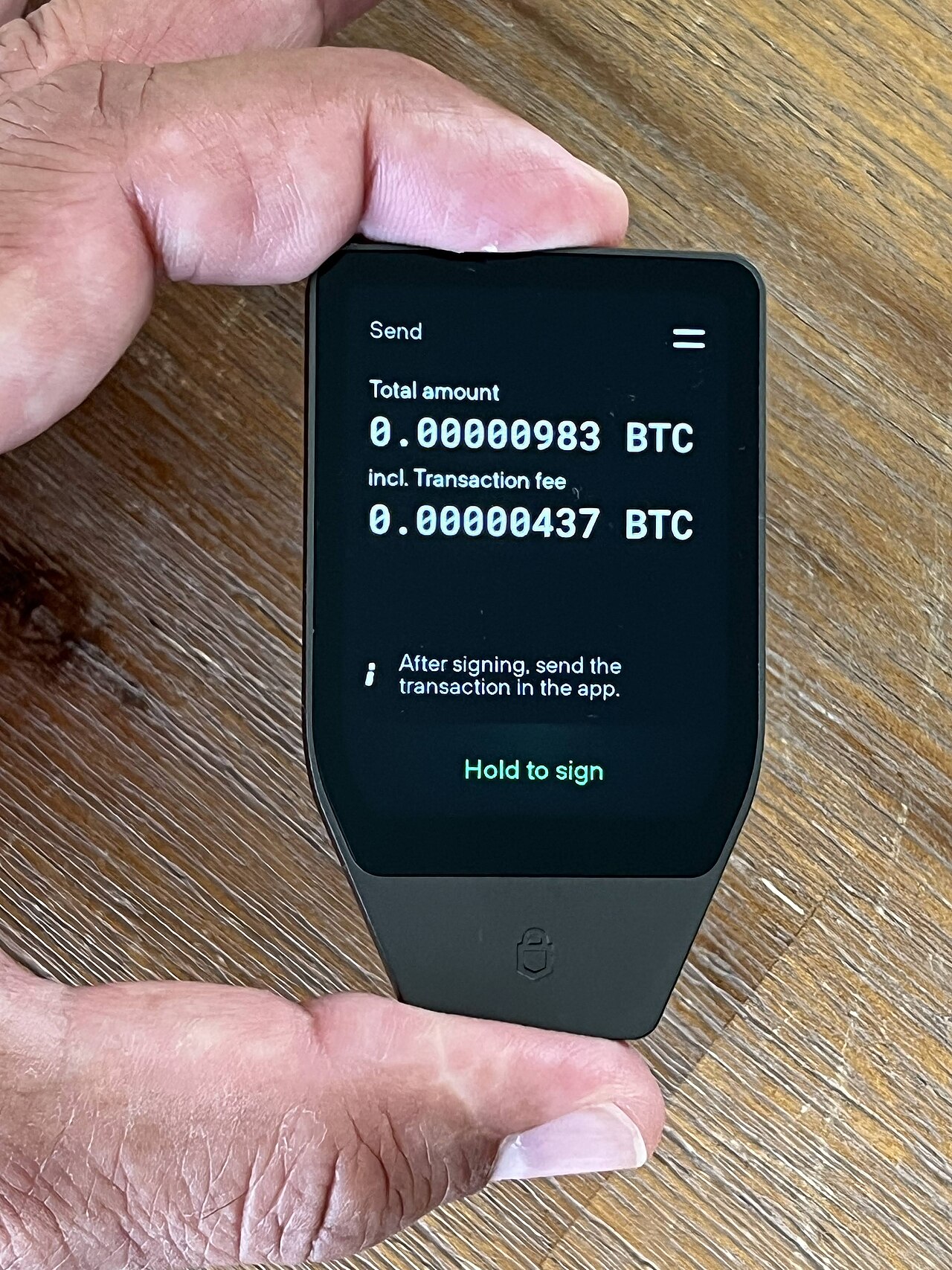
The most secure crypto wallet is only as safe as the moment you approve a payment. A hardware wallet's own screen tells the truth even if your computer is infected, but only if you read it. Before you approve, check three things on the device, not on your computer:
- the receiving address, every character, against where you meant to send;
- the amount and the network fee;
- for an app or contract, what it can do: a single payment, or permission to spend your tokens later.
If the device can only show a string of unreadable code where that last point should be, you are signing blind: approving something you can't read. Don't, especially for an unlimited token approval. This is the main difference between a hardware wallet with a screen and one without, and why it carries so much weight in our ranking.
Buying and setting up a hardware wallet safely
The best way to store crypto you are keeping is on a hardware wallet you set up yourself, with a backup only you hold.
- Buy from the maker, or a reseller the maker lists. A second-hand device may have been set up by someone else.
- Check the box on arrival. Compare the packaging and seals with the maker's own setup guide, and contact the maker if anything looks opened.
- Let the device create the backup. A new wallet should generate its recovery phrase on the device during setup. If one comes printed in the box, don't use the device.
- Write the backup by hand, offline. Never type the recovery phrase into a phone, a computer, a cloud note or a photo. No company will ever ask for it.
- Decide on a passphrase. If you add one, store it separately from the recovery words, and make sure someone you trust could find both.
- Update the firmware through the maker's own app before you load any money.
- Send a small test amount first, check that it arrived, then move the rest.
- Practise a recovery. Most devices let you check the backup on the device. Do it once while the amount is small.
If the wallet is lost, stolen or the company disappears
Because the coins are recorded on the blockchain, losing the device doesn't lose them. The recovery phrase, or Tangem's spare card, proves they are yours. If a device is lost or broken, buy a new one and restore from the backup.
A thief who takes the device still needs your PIN, and most devices wipe themselves after repeated wrong guesses. A thief who finds your written backup needs nothing else, which is why a passphrase helps.
If the maker goes out of business, most standard recovery phrases can be restored in another maker's wallet. Tangem's card-only backup is the exception, so Tangem owners who want that safety net should create the optional recovery phrase too. Trezor shows how support usually winds down: it stopped selling the Model One and Model T in January 2026 and says it will keep maintaining them to at least 2031.
Think about inheritance as well. If nobody knows the backup exists, or where the passphrase is kept, the coins are gone when you are. Leave instructions with someone you trust or with your will, without writing the words themselves into it.
Ongoing costs
None of the picks charge a subscription to hold coins. Costs you may meet:
- network fees on every payment, set by the blockchain and shown before you confirm;
- swap spreads inside apps, which we couldn't confirm for Exodus, MetaMask or Trust Wallet;
- optional extras: Ledger Recover ($9.99 a month) and MetaMask's Transaction Shield ($9.99 a month).
Wallets we left out
Coldcard. In July 2026 its maker, Coinkite, warned that a flaw in how its devices generated random numbers, dating back to firmware from March 2021, made some keys weaker than they should be. Analysts at TRM Labs linked thefts of about 1,816 bitcoin to it (TRM Labs). New firmware fixes new wallets, but keys made before the fix stay weak, so owners have to move their coins to a new wallet. We'll look at it again once that clean-up is behind it.
Keystone 3 Pro. An air-gapped device, meaning it never connects by cable or wireless and passes data by QR code. We couldn't confirm its standalone price on the maker's shop, so it isn't ranked yet.
Coinbase Wallet. A non-custodial app, separate from a Coinbase exchange account. It was renamed Base App in 2025 and renamed back in 2026, and Base's documentation still uses the other name. We'll review it once that settles.
Questions people ask
What is the safest crypto wallet?
A hardware wallet with its own screen, a certified secure chip and open-source code, bought direct from the maker and backed up by hand. Of the wallets here, the Trezor Safe 5 and Safe 3 meet all of that. How you keep the recovery phrase matters as much as the device.
Can a crypto wallet get hacked?
Yes. Apps can be attacked through malware or a bad update, as the Trust Wallet extension was in December 2025. Hardware wallets are much harder to attack from afar; most losses come from people approving a malicious transaction or giving away their recovery phrase.
Are cold wallets 100% safe?
No. A cold wallet protects keys from online attacks, but it can't stop you signing a bad transaction, and a flawed device can create weak keys, as Coldcard owners learned in 2026. Read the device screen before approving, and keep the backup offline.
Do I need a hardware wallet?
If you hold an amount you would be upset to lose, yes. For small amounts you spend often, a free app is fine. Many people use both.
Is a Bluetooth hardware wallet less safe than one with a cable?
Bluetooth adds a wireless link that a cable-only device doesn't have, but the keys still stay on the device and every payment is still approved on its screen. If you rarely use a phone, a cable-only device such as the Trezor Safe 5 removes the question. Devices like the BitBox02 Nova let you switch Bluetooth off.
What is the difference between a custodial and a non-custodial wallet?
With a custodial wallet, such as an exchange account, the company holds the keys and can freeze, lose or recover your coins. With a non-custodial wallet you hold the keys yourself, so nobody else can move or recover your coins.
Can someone steal my crypto with my wallet address?
No. An address is safe to share; it only lets people send to you. The risk is "address poisoning": scammers send tiny amounts from a lookalike address hoping you will copy it later. Copy addresses from the source, and check every character.
Is Coinbase Wallet or Trust Wallet better?
Both are non-custodial phone apps, so you hold the keys in either. We rank Trust Wallet's phone app here, and haven't reviewed Coinbase Wallet yet because of its renaming. If you already buy on Coinbase, its wallet app is the shorter path; either way, move savings to a hardware wallet.
What is the best wallet for Bitcoin?
The BitBox02 Nova in its Bitcoin-only edition, used with Sparrow on a computer. Every hardware wallet here supports Bitcoin, so a Trezor or Ledger works too if you also hold other coins.